How is a touchpad better than a trackball

A touchpad and trackball mouse are two different pointing devices (mouse).
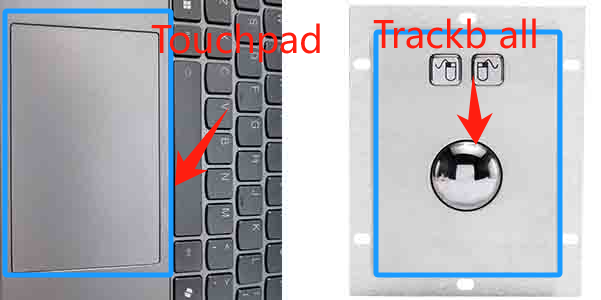
From the above picture, we can see that the difference between a touchpad mouse and trackball mouse is quite big. After having a preliminary understanding, let's take a brief look at their working principles:
Working principle of touchpad mouse: The working principle of touchpad mouse is mainly based on capacitive sensing technology, which locates and tracks the moving trajectory by detecting the capacitance change caused by finger contact. When in use, the finger slides on the smooth panel to move the cursor, and usually supports multi-touch gestures (such as zooming, scrolling, etc.).
Working principle of trackball mouse: The user moves the trackball mouse by hand to control the movement of the mouse arrow. During this process, the ball seat of the trackball mouse is fixed. The user directly moves the trackball by hand to drive the rollers on the left and right and the upper and lower sides to rotate. These rollers are equipped with grid wheels, which generate pulse signals for positioning through light-emitting tubes and receiving components.
Now that we have understood the basic principles of touchpads and trackballs, let's analyze the advantages and disadvantages of touchpads and trackballs.
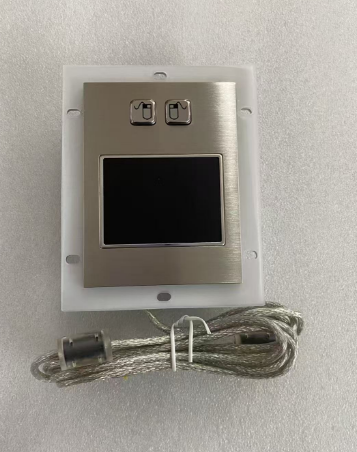
Advantages of a touchpad mouse:
1. Accurate mobile positioning: The touchpad uses a highly sensitive capacitive sensor, which can very accurately detect the size and speed of the position change of the finger and the actions made by people during use, such as double-clicking.
2. Support multi-touch: The multi-touch function allows users to perform some gesture operations, such as zooming, rotating, and scrolling.
3. High operating efficiency: Most operations can be completed by just moving your fingers gently, and your hands are not easily fatigued, making the operation very convenient and efficient.
4. Fast movement speed
5. Less force required
6. More affordable
7. No mechanical parts, not easy to damage
8. Small size, space saving, light weight, easy to carry
Disadvantages of a touchpad mouse:
1. Problems of accidental touch: Common operations of touchpads include zooming, scrolling, and clicking, which require specific gestures. Unfamiliar users need to learn for a short period of time before they can master them. During user operation, accidental touches are inevitable.
2. It takes a certain amount of time to learn and adapt: For users who are used to using a mouse, it may take some time to adapt to the use of a touchpad. Touchpad mouse operation places higher demands on the positioning accuracy, coordination and agility of the fingertips.
3. Damage to fingers: Long-term mobile operation may cause finger fatigue due to friction.
4. Surface stains or liquids may affect the sensitivity and positioning accuracy of the mobile.
In general, a touchpad mouseis another common mouse positioning device that allows users to operate a mouse device by tapping, sliding, or clicking on the touchpad. The advantage of a touchpad is that it responds quickly and can perform a variety of gestures, such as pinch-to-zoom, double-click, etc. Touchpads are commonly found in laptops, and most users may already be familiar with how to use them.
Advantages and Disadvantages of Trackball mouse
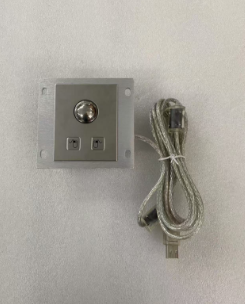
1. Accurate pointer positioning: Trackball mouse can provide high mobile positioning accuracy, allowing users to perform fine positioning operations without moving the wrist, which can reduce fatigue.
2. Has a rolling direction that conforms to personal habits: If the user wants to roll in the opposite direction, just change the rolling direction of the trackball mouse
3. Easy to operate: There is no threshold to use, easy to operate, and very easy to use.
4. The price is relatively high
5. With a mechanical structure, the bearings may wear out after long-term use, resulting in poor rotation.
Disadvantages of Trackball mouse:
1. Requires additional space for use: The trackball mouse needs to be placed in the user's work area and has a certain volume. And the trackball needs to be used with fingers. This implies that the user must place the hand in the same position and need to clean the hand regularly during use.
2. Low operating efficiency: Compared with the touchpad mouse, the operation of the trackball requires more hand movements, especially when operating the stainless steel trackball, a certain amount of force must be used to move. After a long period of movement, the user's hand muscles are more likely to become uncomfortable and fatigued.
3. Slower movement speed
4. Compared with touchpad mouse, it requires more space, and the trackball mouse is large and heavy.
In general, the trackball mouse is very comfortable to use. You can put your hand on it without moving it. It feels so good to fiddle with the ball with your fingers. The cursor moves very smoothly. You can move it with just a slight movement of your fingers. It is especially suitable for large screens such as dual screens or ultra-wide screens. The whole hand is very relaxed. It can really relieve hand fatigue and make the whole arm much more relaxed when working for a long time. The trackball mouse can be used anywhere, on a piano, a game console, a CNC machine, a sofa armrest, or even on your legs. The traditional mouse looks flexible, but it needs a flat area to work. It doesn't work well without a mouse pad, but it is definitely not as good as a traditional mouse for playing games.
For the best choice of a touchpad mouse and trackball mouse:
When choosing a touchpad or trackball mouse, you need to consider environmental factors comprehensively and decide according to the specific use environment. For example, home use, study, and gaming and entertainment are not introduced here. Here we focus on the selection in special environments such as industry. Consider dust, chemicals, temperature, operation requirements (precision, protection level) and user habits. The following is an analysis of the characteristics of different application scenarios:
High frequency use, diverse users, susceptible to oil stains and fingerprints; need to prevent accidental touch, wear resistance, and adapt to different operating habits. The ambient temperature and humidity change greatly, and there may be a risk of liquid splashing, which requires easy cleaning and anti-vandalism (anti-destruction) design.
Corrosive substances such as strong acids, strong alkalis, and organic solvents are easy to contact; the equipment needs to be resistant to chemical corrosion and liquid penetration to avoid circuit damage. Operators may wear gloves, and input devices must be compatible. Cleaning and disinfection requirements are high.
High temperature, high humidity, and salt spray corrosion are serious. The equipment needs to be resistant to moisture and heat (above 40°C) and salt spray; the vibration is large, and the mechanical structure needs to be stable. The space is limited, and the operation may be affected by bumps, so a stable and durable input solution is required.
4. Coal mine/high dust environment
The dust concentration is high, which is easy to block the gaps in the equipment; it may contain flammable gases, and explosion-proof design is required (such as underground coal mines). Mechanical parts need to be dust-proof and sealed to avoid failure due to dust accumulation. Thick gloves may be worn during operation, and strong compatibility is required.
5. Medical environment (operating room, laboratory)
Strict sterility requirements, frequent disinfection (alcohol, ultraviolet rays); may come into contact with body fluids and chemical reagents. The operation needs to be precise (such as medical imaging), and sterile gloves need to be worn in some scenes. The equipment needs to be highly sensitive and easy to clean.
6. Industrial control (precision operation)
Long-term high-precision operation (such as CAD, CNC control) requires low latency and high DPI; the environment may have oil pollution and electromagnetic interference. The equipment needs to be durable and adaptable to high-intensity use. Some scenarios require anti-vibration and anti-static designs.
Founded in 1995, KEYU has long been committed to the research, development, production and sales of metal stainless steel keyboards, trackballs, and metal touchpads. The products have passed CE, FCC, IK08, IP65, IP67 and other certifications. There are various installation methods and products of different sizes. You can browse our website or send an email to learn about our products.
Through the above introduction, I believe that everyone should have a more comprehensive understanding of how to choose a touchpad or trackball mouse that suits them. Welcome to consult us.
KEYU newly developed product silicone rubber keyboards
Which keyboard is better mechanical or membrane
Related Article